
A price genuinely matched to your data needs
A company with a handful of sources and a few dozen KPIs does not have the same needs as an organisation consolidating several systems, several teams and hundreds of indicators.
With Biron, the price follows that reality.
STEP 1
Setting up your sources
Paid once, to connect the sources you use
ERP, CRM, accounting, logistics, operations. Connecting your data sources and building your reference is a piece of work in its own right. It is priced at scoping and paid once, not every month.
OPTIONAL · QUOTED
Adding a new source, at any time
A new tool, or a part of the business never modelled before — supplier orders from an Odoo you have already connected, say: it is connected whenever you need it, on a new quote with an announced delivery date. Once in place, its changes are covered by your plan.
What is priced
What makes the price vary
Connecting the source systems
Number of systems, quality of the documentation, access available
Modelling the reference
Number of metrics to define, share of bespoke definitions
Reconciling the entities
Number of charts of accounts or product references to unify
Historical data migration
Depth required, format of the archives
STEP 2
The number of metrics
Priced on the size of your reference
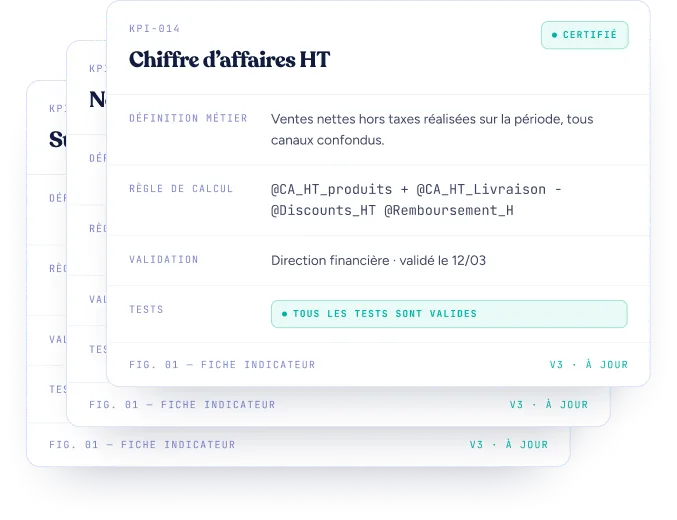
A metric is a KPI defined and made reliable with your teams, written into your data dictionary: net revenue, margin, acquisition cost, conversion rate, stock-out rate and so on. The more indicators your company steers by, the richer your reference becomes.
STEP 3
Your data volume
Priced on the volume of data you use
Not every company handles the same volume of data. Our pricing therefore follows the amount of data your infrastructure has to store, transform, check and make usable.
The price you pay is measured directly on the volume of data you actually processed, observed over three consecutive months.
The first ten million rows processed are included in the base price. Beyond that, the price follows tiers.
Data volume processed
Included up to 10 million rows
Everyday support is included
None of your requests is left unanswered
On every plan, Biron supports you on your requests, from the simplest to the most involved.
-
Need a hand?
Unlimited, at no extra cost
Everything that is about getting started and everyday running. We answer, and it uses up nothing at all.
- Opening an access, changing a permission
- Restarting a failed load, automatically
- A question about how to use the platform
-
Need a figure checked?
Monthly allowance included
A figure that surprises you. We look for where the gap comes from, answer you and fix it if need be — without taking the place of a change request.
- A gap between two dashboards
- A figure that looks wrong or missing
- A total that does not match your ERP
-
Need something built for you?
Monthly allowance included
Everything that grows your reference. You open as many as you like; your plan sets how many move forward at once, and you decide the order.
- Creating a new metric
- Adding an analysis dimension
- Redefining a calculation rule
- Building a new dashboard
Three examples to picture it
Here are three configurations to illustrate the kind of projects Biron supports and their orders of magnitude. Every proposal is shaped around the data, the uses and the level of support agreed.
-
Scenario 1
Steering the business on shared figures
The situation
A brand starts on a focused e-commerce perimeter: its sales and its headline performance indicators.
With Biron
Biron builds the reference data, makes it available in its dashboards and spreadsheets, and plans a level of support that suits the perimeter.
The outcome
The team has shared figures without redoing its exports and its calculations for every review.
Example budget about
€1,500 excl. tax per month Initial set-up: quoted separately, according to the sources, the indicators and the history to migrate. -
Scenario 2
The same data to steer the business and to work with AI agents
The situation
A company works from a wider reference — sales, margin, stock and marketing, say. It wants to use that both to steer the business and with its tools and AI agents.
With Biron
The teams have reference indicators in their dashboards and their spreadsheets. The agents can query those same indicators, cross the axes of analysis and dig further.
“Which countries, channels and product families is the drop in margin concentrated in?”
The outcome
The data prepared for people becomes usable by the agents too, with no need to rebuild a second reference alongside it.
Example budget about
€3,500 excl. tax per month Initial set-up: quoted separately, with the agreed accesses and integrations explicitly scoped. -
Scenario 3
One reference shared across departments, with large volumes
The situation
An organisation consolidates several systems and markets. Finance, sales, marketing and operations all need one shared reference and analyses suited to their own work.
With Biron
The project covers a wide perimeter, larger volumes and more history, along with several uses: dashboards, spreadsheets, tools and agents as needed. The data team can take part in growing the setup, according to the accesses agreed.
The outcome
Each department can dig into its own analyses without rebuilding its own reference data, while leadership keeps a consolidated reading of the business.
Example budget about
€7,000 excl. tax per month Initial set-up: quoted separately, according to the systems, the reconciliations and the scope of the rollout.
These budgets illustrate given configurations and are not standard packages. Your proposal sets out the perimeter, the features and the support agreed. The initial set-up is priced separately.
Every feature, one and the same reference
From building your dictionary through to using it in your tools, here are the features and services Biron can bring to your project. Your proposal sets out which features are included, which accesses are opened and what support is planned.
| Feature or service | What it gives you | Billing |
|---|---|---|
| YOUR REFERENCE | ||
| Connected sources | The systems we read data from — ERP, CRM, e-commerce, ad platforms, databases, files and so on. | BillingQuoted, on connection |
| Data dictionary | Defining your metrics — an indicator settled once, with one definition shared by everyone: net revenue, contribution margin and so on — your dimensions (country, category…) and your calculation rules, then producing shared indicators. | BillingDepends on the number of metrics |
| Data volume | Number of production data rows actually processed. | Billing10 M rows included, billed beyond |
| Intraday refresh | Refreshing the data several times a day, where the project provides for it. | BillingOptional |
| Read and share | ||
| Dashboards and alerts | Following the indicators and alerts set up for how you steer. | BillingIncluded |
| Excel and Google Sheets plug-in | Working with your reference data natively in your spreadsheets, updated automatically. | BillingIncluded |
| File exports | Sending the data of the agreed perimeter out as files. | BillingIncluded |
| Users | Access to the dashboards and plug-ins. | BillingUnlimited |
| Basic rights management | Read / write access to the dashboards, access to the plug-ins | BillingIncluded |
| Advanced rights management | Defining data models — filterable subsets of the data dictionary — so you can grant access to, say, revenue excluding tax in France but not to margin | BillingOptional |
| Connect your tools and your agents | ||
| API and SQL querying of the dictionary | Querying your indicators from your own tools, in the same language and with the same definitions as in your dashboards. | BillingOptional |
| MCP connector for your AI agents | Compatible with Claude, Mistral, ChatGPT and OpenCode: giving the agents the same dictionary, the same indicators and the same ways of crossing them. | BillingOptional |
| Zapier, n8n and automations | Feeding your workflows with the reference data, according to the integrations agreed. | BillingOptional |
| Work with your data team | ||
| Write access to the semantic model | Letting your team create and change the definitions in the reference. | BillingOptional |
| Forge and back-office access | Working in the modelling environment Biron itself uses. | BillingOptional |
| Warehouse exposed in SQL | Querying the ClickHouse warehouse directly for your analyses, tools and scripts. | BillingOptional |
| Run it and grow it | ||
| Freshness monitoring | Checking that data arrives and is refreshed. | BillingIncluded |
| Support | Getting help with accesses, exports and using the platform. | BillingIncluded |
| Doubt about a figure | Finding where a gap comes from, explaining it to you and dealing with it. | BillingIncluded |
| Changes to the reference | Evolving the metrics, the dimensions, the rules and the outputs within the agreed level of support. | BillingIncluded, allowance depends on the plan |
| Adding new sources / perimeters | A new CRM, API, ERP and so on. | BillingQuoted |
The initial set-up is priced separately. Technical accesses, specific integrations and the level of support are defined with you: they are not all included automatically.